Application Description
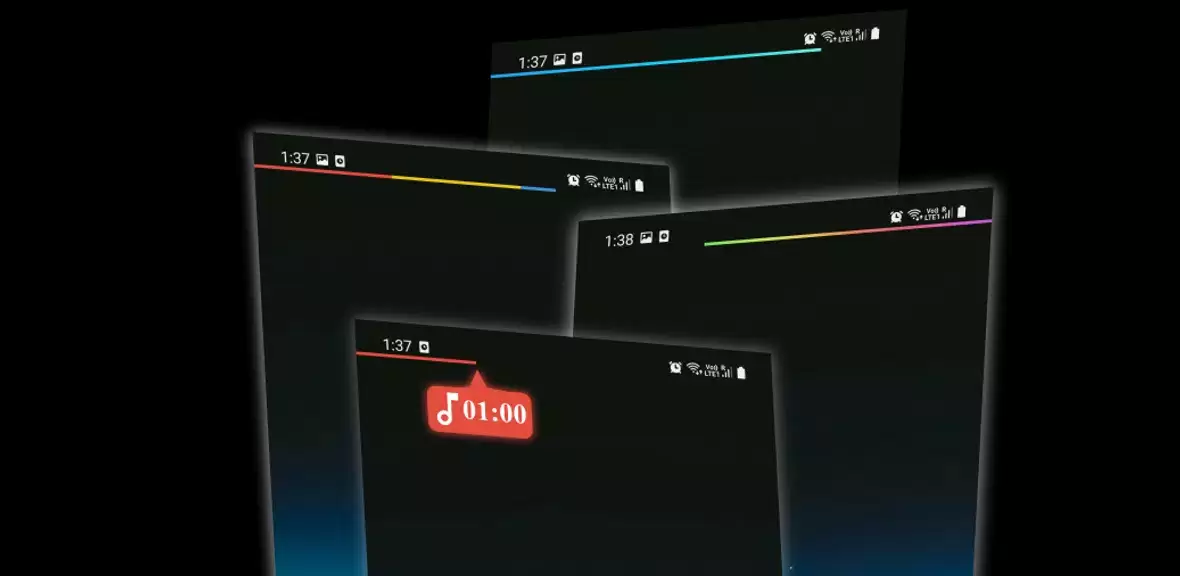
MediaBar (beta): A revolutionary app transforming your system's status bar into a sleek media playback controller. Seamlessly manage your music, podcasts, and videos without interrupting your workflow. Whether you're browsing the web or multitasking, effortlessly track progress and navigate content with simple swipes and taps.
Key Features:
- Intuitive Media Control: Directly control playback from the status bar.
- Customizable Progress Bar: Track playback with a color-coded progress bar.
- Invisible Buttons: Assign quick actions to three customizable invisible buttons.
- Versatile Playback Controls: Enjoy play/pause, forward, backward, and more.
- Flexible Settings: Adjust bar thickness, position, background opacity, and origin.
- Dynamic Color Options: Choose from dynamic colors based on app or album art, or use gradient color changes.
Conclusion:
MediaBar provides a convenient and efficient solution for managing media playback. Its innovative features and customizable settings allow for focused productivity while enjoying your favorite audio and video content. Download now and experience enhanced media control!
Screenshot