Unlocking the Hideout in *Assassin’s Creed Shadows* opens up a delightful feature: the ability to customize your space with pets and other animals. Here’s how you can add these companions to your Hideout and make it feel like home.
How to Unlock Animals in Assassin’s Creed Shadows
To unlock various animals for your Hideout, interact with them in the game world. Each time Naoe or Yasuke pets a cat or dog of a breed they haven’t encountered before, that animal becomes available for your Hideout. From strays to the special pup you save in the pre-order DLC quest “Thrown to the Dogs,” there’s a wide variety of dogs, puppies, cats, and kittens waiting to join your League.
Yasuke can also unlock smaller critters like rabbits, fox kits, tanukis, and monkeys by painting them in the wild. These animals, once documented, can be added to the Hideout for a touch of wilderness.
For those interested in farm life, vendors across Japan offer oxen and goats for purchase with mon, allowing you to bring a slice of rural charm into your space.
How to Add Animals to the Hideout in Assassin’s Creed Shadows
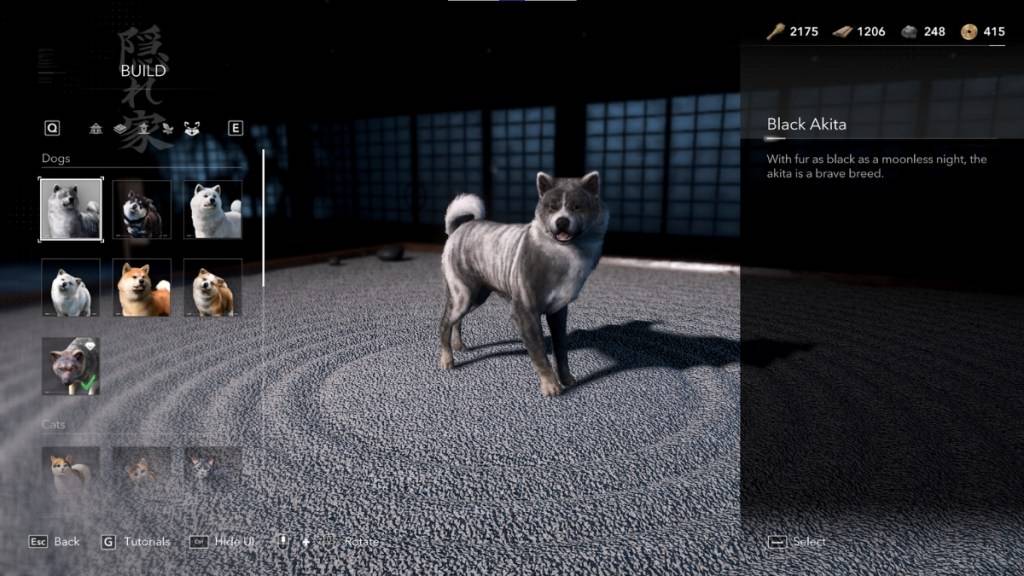
Select the animal you wish to add, and you’ll be taken to an overhead view of the Hideout. Choose an open grid on the map to place your new companion. Remember, animals will roam freely once you exit build mode, so they might not always be in the same spot when you’re looking for a cuddle.
You can add multiple instances of the same animal, except for the special pup from “Thrown to the Dogs.” However, there’s a limit to the total number of animals you can have, so plan your menagerie wisely. If you change your mind, you can always remove or replace animals in build mode at any time.
That’s how you can transform your Hideout into a cozy sanctuary filled with furry and feathered friends in *Assassin’s Creed Shadows*.
*Assassin’s Creed Shadows is available now on PC, PlayStation 5, and Xbox Series X|S.*