Experience Fortnite Mobile on your Mac today! Learn how to play seamlessly with our step-by-step guide using BlueStacks Air.
Fortnite Mobile, developed by Epic Games, combines battle royale action with creative sandbox survival. The Item Shop serves as the game's marketplace, offering daily rotating collections of cosmetic upgrades – from character skins to expressive emotes. This guide covers everything from navigating the shop and acquiring V-Bucks to strategic purchasing tips for maximizing your in-game style.
Accessing the Item Shop
Getting to the Item Shop takes just a few simple steps:
Launch Fortnite on any compatible device Navigate to the Item Shop tab from the main menu Explore the categorized selection of current offerings Select any item to view purchase details
New items refresh daily at midnight UTC, with previous selections potentially cycling out.
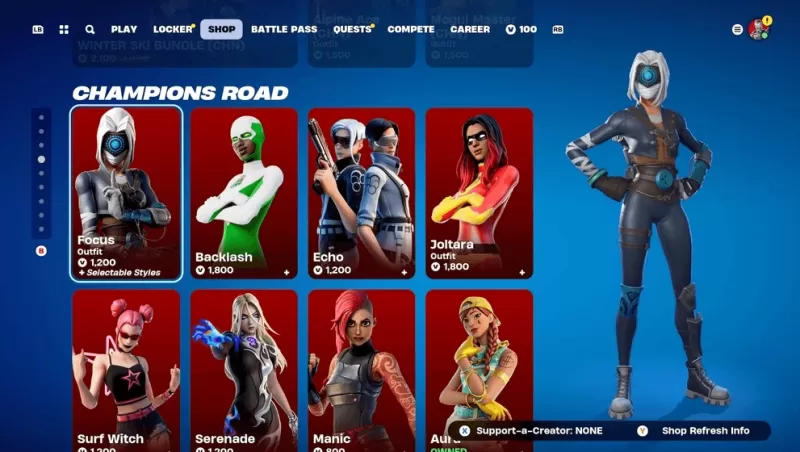
Smart Shopping Techniques
Check daily updates – Never miss limited-time items with regular visits Prioritize rare skins – Some event cosmetics may not return for extended periods Evaluate Battle Pass value – Often provides more content per V-Buck than individual purchases Watch for bundle deals – Bundled items frequently offer better discounts Track upcoming releases – Prediction sites help plan purchases for wanted items
As Fortnite's central customization hub, the Item Shop delivers fresh cosmetic options daily. By mastering shop navigation, V-Buck management, and strategic buying approaches, players can enhance their gameplay experience with personalized flair. Mac players should reference our installation guide for optimal setup. Game on with BlueStacks' desktop Fortnite Mobile experience!