Motion sickness can be a real buzzkill when diving into the immersive world of first-person games like *Avowed*. If you're feeling queasy while exploring, fear not! Here are the best settings to help reduce motion sickness and keep your gameplay enjoyable.
The Best Settings to Reduce Motion Sickness in Avowed
In first-person games, motion sickness often stems from head movement, camera shake, field of view, and motion blur. *Avowed* is no exception. Let's dive into the settings that can help you play without feeling sick.
How to Remove Head Movement and Camera Shake
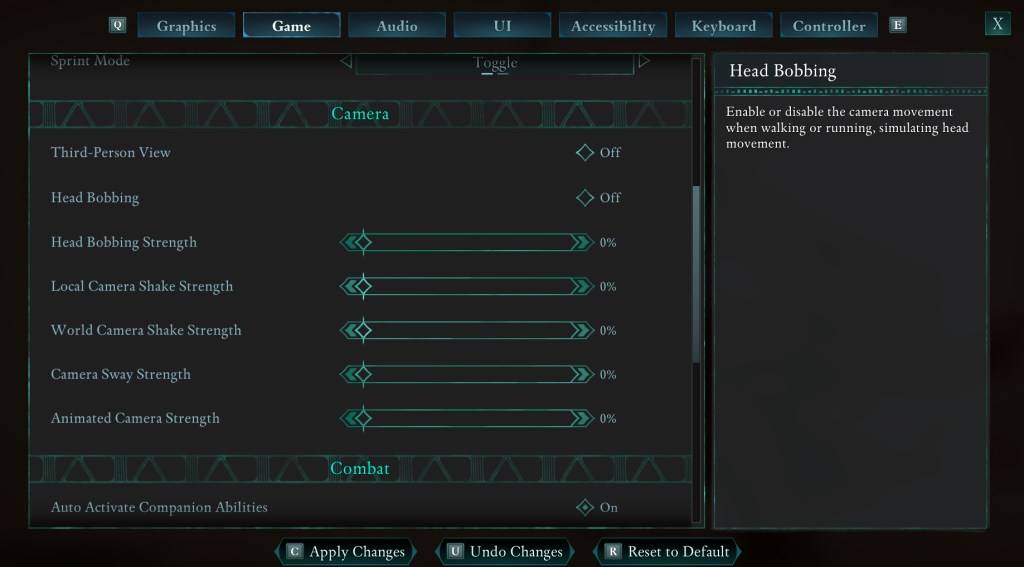
To tackle head movement and camera shake, which are common culprits of motion sickness, navigate to the **Settings** menu and select the **Game** tab. Scroll down to the **Camera** section and adjust the following settings:
- **Third-Person View:** Off or on (this doesn't affect motion sickness).
- **Head Bobbing:** Off
- **Head Bobbing Strength:** 0%
- **Local Camera Shake Strength:** 0%
- **World Camera Shake Strength:** 0%
- **Camera Sway Strength:** 0%
- **Animated Camera Strength:** 0%
These adjustments should significantly reduce motion sickness. Feel free to tweak these settings to find the perfect balance of immersion and comfort for your gameplay.
How to Fix the Field of View and Motion Blur
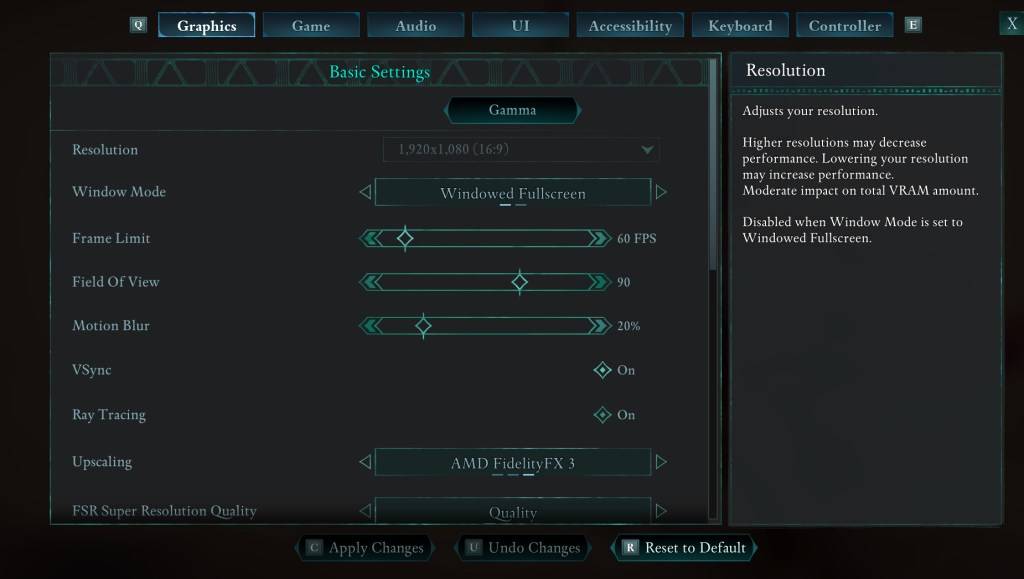
If head bobbing and camera shake adjustments aren't enough, head to the **Settings** menu and click on the **Graphics** tab. You'll find the **Field of View** and **Motion Blur** sliders under the basic settings. Here's what to do:
- **Field of View:** Start by lowering the slider. Gradually increase it until you find a comfortable setting. This might take a few attempts to get right.
- **Motion Blur:** Turn off or significantly reduce **Motion Blur**. Begin at zero and adjust as needed to minimize motion sickness.
What If You’re Still Feeling Motion Sick?
If you're still experiencing motion sickness, continue experimenting with the settings. Consider switching between first-person and third-person views as needed. If all else fails, don't force yourself to play through the discomfort. Take a break, hydrate, and try again later.
These are our top recommendations for reducing motion sickness in *Avowed*. Enjoy your gaming experience without the nausea!
*Avowed is available now.*