*Splitgate 2* is poised to be one of the most eagerly awaited games of 2025. Gamers worldwide are buzzing with excitement to dive into the sequel of this beloved title. However, being in the Alpha stage, *Splitgate 2* is still a work in progress, which means players might encounter crashes, frame drops, and various performance hiccups. Fortunately, by tweaking your settings, you can mitigate these issues. Here, we'll guide you through the optimal settings for *Splitgate 2* to achieve a high framerate and reduce input lag.
Splitgate 2 System Requirements
Before delving into optimization, ensure your system meets the game's requirements. *Splitgate 2* is designed to be accessible, boasting relatively modest system specifications.
Minimum:
- Processor: Intel® Core™ i3-6100 / Core™ i5-2500K or AMD Ryzen™ 3 1200
- Memory: 8 GB RAM
- Graphics: NVIDIA® GeForce® GTX 960 or AMD Radeon™ RX 470
Recommended:
- Processor: Intel® Core™ i5-6600K / Core™ i7-4770 or AMD Ryzen™ 5 1400
- Memory: 12 GB RAM
- Graphics: NVIDIA® GeForce® GTX 1060 or AMD Radeon™ RX 580
Splitgate 2 Best Video Settings
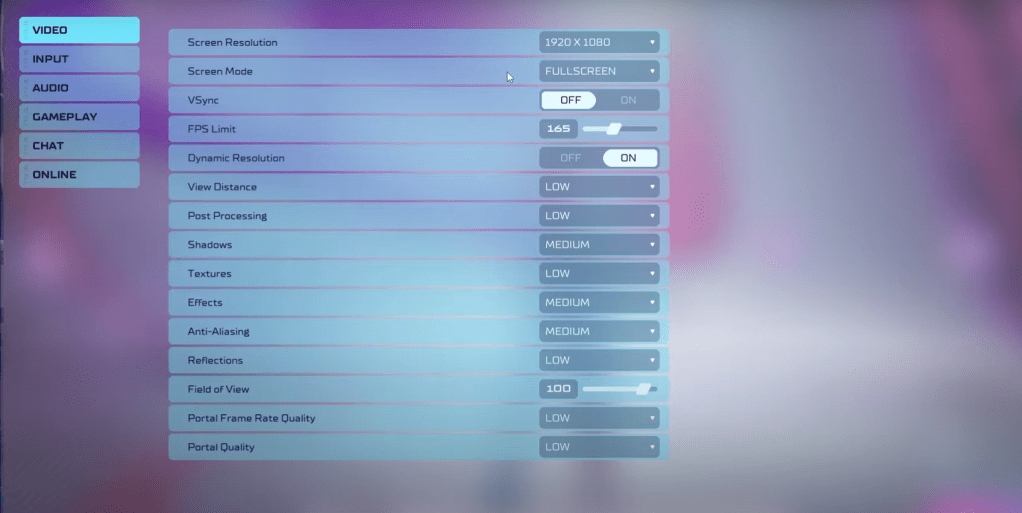 As a competitive multiplayer shooter, *Splitgate 2* demands prioritizing performance over visual flair. Here are the best video settings to enhance your gameplay experience:
- Screen Resolution – Set to your monitor's native resolution (commonly 1920×1080).
- Screen Mode – Opt for Borderless Fullscreen if you frequently switch between apps, otherwise go for Fullscreen.
- VSync – Turn it off to minimize input lag.
- FPS Limit – Match your monitor’s refresh rate (e.g., 60, 144, 165, 240).
- Dynamic Resolution – Enable it, though you might want to experiment with it off, as results can vary.
- View Distance – Set to Low.
- Post Processing – Keep it Low.
- Shadows – Medium is advised, but you can drop to Low if your system is older.
- Effects – Low to prioritize performance.
- Anti-Aliasing – Start at Low, but you can increase if you see shimmering.
- Reflection – Low to maintain performance.
- Field of View – Maximize for better situational awareness, though slightly reducing it can help with framerate.
- Portal Frame Rate Quality – Low to keep things smooth.
- Portal Quality – Low for optimal performance.
In summary, setting most options to their lowest setting is key. If the visuals are too compromised, consider bumping up Effects and Anti-Aliasing, which are less demanding on performance.
The Field of View setting can be particularly taxing on frame rates. While a maxed-out FOV is ideal for competitive play to gather as much information as possible, reducing it slightly can offer significant performance boosts without much visual impact.
Other Recommended Settings for Splitgate 2
While not directly impacting frame rates, adjusting other settings can enhance your overall gaming experience. Sensitivity settings are crucial; fine-tune them to your preference or use an online calculator to convert settings from other shooters you enjoy.
For audio, consider lowering the in-game music to reduce distractions. Activating Spatial Sound in Windows can also heighten your audio cues, helping you locate in-game sounds more accurately.
With these settings, you're well on your way to optimizing *Splitgate 2* for a smoother and more enjoyable gameplay experience.