Microsoft Family Safety - Empowering Families with Digital Safety and Healthy Habits
Get peace of mind and create healthy digital habits with the Microsoft Family Safety app. This app empowers you and your family to stay safe both online and in the physical world. With features like parental controls, content filters, and activity reporting, you can ensure your children have a safe and educational online experience.
Microsoft Family Safety offers several features designed to help families create healthy digital habits and provide digital and physical safety for their loved ones. Here are six key features of the app:
- Parental Controls: Users can set up parental controls to filter inappropriate apps and games and ensure safe web browsing on Microsoft Edge for their children.
- Screen Time Management: The app allows parents to set limits for specific apps and games on Android, Xbox, and Windows devices. It also enables device management to set screen time limits across devices on Xbox and Windows.
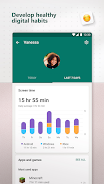
- Activity Reporting: Users can access activity reports that provide insights into their family's digital activity. Weekly email summary reports help start conversations about online activity with kids.
- Location Sharing: The app provides a GPS family location tracker to locate loved ones. Users can also save frequently visited places like work and school.
- Driving Safety: Microsoft Family Safety offers driving reports that show top speed, hard braking, acceleration, and phone usage while driving. It helps users build better driving habits and understand their family's on-road behavior.
- Privacy and Permissions: The app prioritizes user privacy and data protection. Microsoft ensures meaningful choices and information about data collection and usage, with no sharing of location data with insurance companies or data brokers.
Based on these features, Microsoft Family Safety is an essential app for families looking to create a safe digital environment for their loved ones. With its parental controls, screen time management, activity reporting, location sharing, and driving safety features, this app provides comprehensive digital and physical safety solutions. Users can easily monitor and manage their family's online activities, set healthy habits, and stay informed about their loved ones' whereabouts. The app's focus on privacy and data protection further adds to its appeal. Click now to download and start empowering your family's digital well-being.