Quick Links
Dive into the fun of Untitled Tag Game, a captivating tag simulator boasting diverse game modes! Upon launching, you'll find yourself amidst a Roblox arena teeming with players – prepare to chase or evade, depending on your in-game role and the current mode.
Earn Coins, the in-game currency, to customize your character with cosmetic items. Redeeming Untitled Tag Game codes provides a generous boost of Coins, saving you the time needed to amass them through gameplay.
Updated January 9, 2025, by Artur Novichenko: This guide is regularly updated to ensure you have access to the latest codes.
All Untitled Tag Game Codes
 While cosmetic items don't enhance gameplay, they're a fantastic way to make a statement. Redeeming codes offers a quick path to acquiring Coins, allowing you to purchase outfits and effects from the outset.
Active Untitled Tag Game Codes
happyholidays- Redeem for 250 Coins.UPUPDOWNDOWNLEFTRIGHTLEFTRIGHTBASTART- Redeem for 500 Coins.100M- Redeem for 500 Coins.HALLOWSISCOMING- Redeem for 500 Coins.ZANY- Redeem for 250 Coins.SEPT2022- Redeem for 250 Coins.UTGBOT- Redeem for 250 Coins.ADDWALLRUNNING- Redeem for 250 Coins.NICOPATTY- Redeem for 250 Coins./E FREE- Redeem for 100 Coins.PERPETUALMOTION- Redeem for 100 Coins.CROWNIES- Redeem for 100 Coins.8ACE00- Redeem for 100 Coins.THEOTHERTAG- Redeem for 500 Coins.bombplushie- Redeem for 500 Coins.roblox_rtc- Redeem for 500 Coins.thankyou- Redeem for 500 Coins.
Expired Untitled Tag Game Codes
frogkarellSubtoPoliswaggs4122YOCHATMurmCodeUpdate!
How to Redeem Codes for Untitled Tag Game
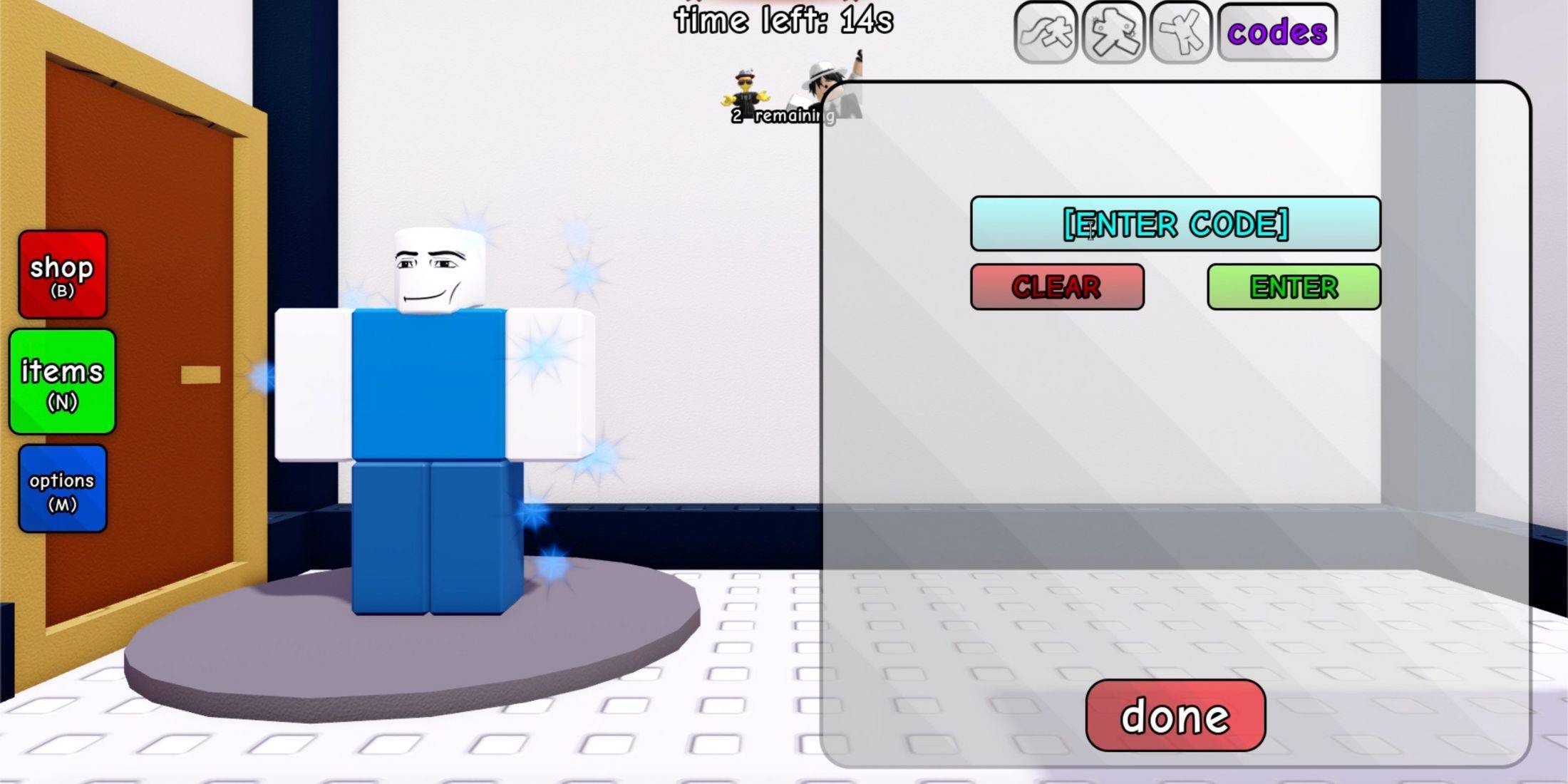 Redeeming codes is quick and easy! There are no prerequisites or tutorials; the redemption feature is immediately accessible. Follow these simple steps:
- Launch Untitled Tag Game.
- Access your inventory by pressing the 'N' key.
- Locate the "Codes" button in the right-hand section of the inventory menu (above your item list). Click it.
- In the redemption menu, enter (or paste) an active code into the input field.
- Click the green "Enter" button to submit.
Upon successful redemption, you'll see "REDEEMED CODE!" displayed, and the rewards will be added to your balance.